
Muse Spark 1.2 Review: Meta's Terminal Coding Agent Is Finally Here
Hands-on review of Meta's Muse Code terminal agent and Muse Spark 1.2. Testing persistent subagents, local event logs, /grill slash commands, and pricing.


Table of Contents
Meta shipped Muse Code in beta on August 5, 2026. It's a terminal coding agent that runs on Muse Spark 1.2 - a new model built specifically for coding. One install command, and you're in.
curl -fsSL https://dev.meta.ai/install.sh | bash
That's it. macOS and Linux only right now. As per Meta's official research blog and the Muse Spark pricing page, carefully.
What Muse Code Does
you give it a task, and it handles the whole thing across your repository. Planning the changes, writing the code, and checking whether it actually works. According to Meta's official blog, it can coordinate multiple persistent subagents per task to do this faster and with less back-and-forth from you.
That last part — "less intervention" — is the goal every coding agent is chasing right now. Most of them still need you to babysit them through multi-step work. Let's see if Muse Code actually delivers on that.
The Three Design Choices Worth Caring About
Meta made three specific architectural decisions that separate Muse Code from a generic CLI wrapper.
1. Background Agents That Stay Alive
Most terminal agents spawn sub-agents when they need them and shut them down after each task. Muse Code does something different.
From the blog, these specialised background agents remain active for the entire session. They gather information, run next steps, and decide when to report back to the main agent on their own. They don't restart from zero every time you give a new instruction. Why does this matter in practice? Because re-gathering context is expensive — both in time and tokens. If you're working on a large codebase and you give the agent three tasks in a row, a normal agent re-reads half your project each time. Persistent background agents avoid that. This is a practical improvement. Not flashy, but the kind of thing you notice when you're deep in a working session.
2. The Local Event Log
Every single thing the agent does — every model call, every tool run, every edit, every approval you give — gets written to a local append-only log. Meta calls this replay-exact and restart-safe.
What that means: if the session crashes halfway through a long task, the agent can pick up from exactly where it stopped. Not from the beginning. Exactly where it stopped.
I want to be direct about this — this is the most useful feature in the entire launch, and Meta buried it in the middle of the blog post. Anyone who has run a two-hour agentic session that died at step 78 of 90 knows the specific misery of restarting. This solves that problem cleanly.
The append-only design is also smart from a trust perspective. You have a full audit trail. You can see everything the agent did in order.
3. Bundled Slash Commands
Muse Code ships with three built-in commands:
- /plan — turns your task into a step-by-step plan that you approve before anything happens
- /grill — stress-tests that plan, look for problems, and won't stop until the plan holds up
- /goal — works toward a stated objective until it's done
/plan and /goal are fairly standard. Most serious coding agents have something similar. But /grill is the one I'd use constantly.
Here's why. The biggest failure mode in agentic coding is this: you give a vague instruction, the agent makes 40 decisions, half of them are wrong, and now you have a bigger mess than before. /grill makes the agent examine its own plan critically before it touches your code. That's not a small thing.
Muse Spark 1.2: What Changed in the Model
The model itself is a coding-focused upgrade from Muse Spark 1.1. According to Meta's blog, they significantly scaled up training compute on coding tasks and expanded the diversity of training environments. Three specific training decisions from the official announcement:
Co-training with the harness. Meta trained Muse Spark 1.2 inside Muse Code's own runtime. The training included real agent trajectories from Muse Code sessions, plus optimisations for how the agent handles goals, compaction, and subagents. The model and the tool were built together, not separately.
This is actually significant. It means the model understands how Muse Code's agent loop works at a deep level, not just in theory. The trade-off is also real, though — if you try running these weights through a different harness via the API, expect the behaviour to degrade. Co-training with one runtime means the model is tuned for that specific runtime.
Long-horizon training. The model was trained on whole-repository generation, large end-to-end projects, and auto-research tasks. Meta specifically built in planning, goal conditioning, and context compaction so the model can hold direction across very long tasks without losing track of what it was doing.
Self-improvement loop. Meta used Muse Spark 1.1 to generate training data for 1.2. The older model created challenging coding environments and instruction templates. Muse Spark 1.2 then graded candidate solutions on how well they followed requirements. This gave Meta a way to build a large, high-quality training set without pure human annotation.
The result, Muse Spark 1.2, follows complex instructions more precisely than 1.1.
The Kernel Optimisation Test
Meta's flagship demo, even if you don't work with GPU kernels directly.
They tested whether Muse Spark 1.2 could iteratively optimise GPU kernels over 1,000+ tool calls — up to 24 hours of continuous runtime — on NVIDIA Hopper GPUs.
The agent wrote code, compiled it, profiled performance, found improvements, and kept going. For KDA kernels, it designed a chunk-parallel preparation kernel paired with a sequential inter-chunk scan. For MLA kernels, it built a two-kernel Triton pipeline that reused the shared KV latent as both K and V.
The charts in the official blog show the model still improving when the experiment was cut off.
If you don't work with GPU kernels, what this actually tells you is simpler: the model can sustain direction and keep making meaningful progress across very long agentic sessions. That's what matters for regular application development too.
Pricing
Two tiers, same model weights, from the official pricing page:
| Model Tier | Input / 1M Tokens | Output / 1M Tokens | Data Usage Policy |
|---|---|---|---|
| muse-spark-1.2 | $1.25 | $4.25 | Standard Privacy |
| muse-spark-1.2-contributor | $0.10 | $0.20 | Meta trains on your data |
The contributor tier is genuinely cheap — $0.10 per million input tokens for a frontier-adjacent coding model. The trade is stated openly on the pricing page: Meta may use your data to improve its products. Not buried in fine print. Right there on the model page.
Who should use the contributor tier: Personal projects, open-source work, internal tooling where the code isn't sensitive. At $0.10/$0.20, the cost-per-task math changes completely for anyone running heavy agent workflows.
Who should stick to the standard tier: Anything involving client code, proprietary systems, NDAs, or anything you wouldn't want Meta training on. $1.25/$4.25 is the honest price for those cases.
A Few Things To Note
Muse Spark 1.2 is closed-weight. You cannot self-host it, you cannot run it locally, and you cannot inspect it. If that's a requirement for you, this tool doesn't work for your setup. Windows is not supported yet. macOS and Linux only in this beta. Beta means beta. Features will change, rough edges exist, and production-critical workflows should wait for a stable release.
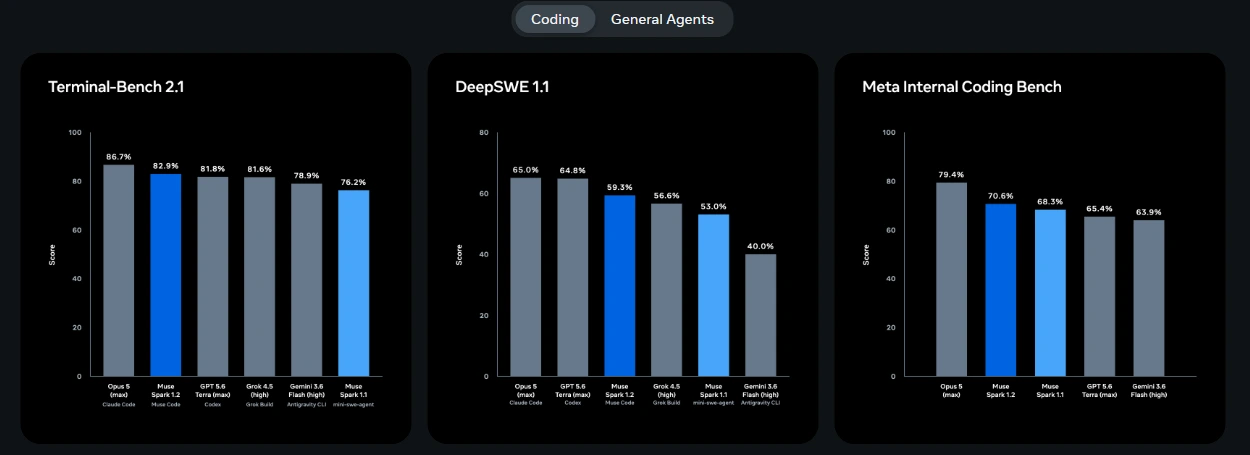
The official benchmarks — Terminal-Bench 2.1, DeepSWE 1.1, and Meta's internal coding bench — are published in the methodology report at research.meta.ai/static/muse-spark-1-2-methodology. Read those charts yourself rather than relying on anyone else's interpretation. If you're on macOS or Linux and already experimenting with terminal-based coding agents, this is worth an hour of your time. The event log alone is a reason to try it. Get started at dev.meta.ai and for windows user, you can still use Ubuntu/WSL.
Share this publication
Related Publications

Bring Antigravity Multi-Agent AI into Your IDE - Official Extensions Now Available
Google released official Antigravity extensions for VS Code, Visual Studio, JetBrains, and Zed — bringing multi-agent AI orchestration and shared project context directly to your editor.

xAI Releases Grok 4.6: Here's What Actually Changed and Why Developers Are Paying Attention
xAI launched Grok 4.6 with major gains on CursorBench (69.9%), deep reinforcement learning for long agentic runs, and launch-day integration in GitHub Copilot and Cursor.