
Your PC is Now an AI Agent: Muse Glimmer Makes Local Vibe Coding Actually Possible
Discover Meta's Muse Glimmer 30B open-weight model. Running local AI vibe coding agents at 233 tok/s with DFlash speculative decoding and 131K context window.


Table of Contents
Running a capable AI coding agent locally has always sounded better on paper than it actually works. You download a model, which runs at 8 tokens per second. You wait 40 seconds for it to reply to a simple question, and then you're back to just using the cloud API. The latency alone kills any flow state. And flow state is the whole point of vibe coding. That's been my experience for the last two years, anyway. I've tried Mistral variants, smaller Llama checkpoints, various quantised models — each one interesting, none of them fast or capable enough to use for real work without constantly hitting a wall.
Meta shipped Muse Glimmer on August 10, 2026, and the pitch is a 30-billion-parameter open model designed specifically for always-on local agent workflows. Not "runs locally in a pinch" — actually designed around the hardware constraints most developers have.
What Muse Glimmer Actually Is
Muse Glimmer is a dense causal transformer with a dedicated perception encoder, distilled from Muse Spark — Meta's much larger model. It has about 29.6 billion parameters total, with a ~1.8B vision encoder baked in. The context window goes up to 131,072 tokens, which for a local model is not something you see often.
The model is released under Apache 2.0, available on Hugging Face, and built with the expectation that you'll run it through tools you already know — Ollama, LM Studio, llama cpp, MLX, ExecuTorch. No proprietary runtime, no sign-up, no subscription.
The key thing Meta focused on with the model isn't just capable, it's built to fit on hardware that real people own. At full BF16 precision, a 30B model needs over 55GB of VRAM — which is a non-starter for pretty much everyone. With their 4-bit quantisation, it compresses to under 20GB. The K-Quant-17GB variant targets 24GB cards, and Meta says accuracy degradation across 15 common benchmarks is around 1%. The K-Quant-Dynamic variant targets 32GB with only 0.2% degradation. That's the kind of precision in trade-off analysis that matters when you're deciding whether to actually use a model for production work.
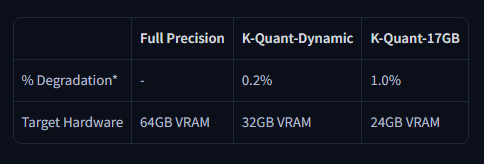
Image credit - huggingface.co/meta-models/Muse-Glimmer-30B
The Speed Problem, and How They Solved It
Here's the thing about local inference that most people underestimate: a model being small enough to fit in VRAM is only half the problem. The other half is whether it generates fast enough to actually be useful inside an agent loop.
Standard language model generation works one token at a time. On a 30B model locally, that can feel painfully slow when you're watching it work through a multi-step coding task. Meta addressed this directly with something called speculative decoding using a companion model based on DFlash. The drafter proposes 16 tokens at once, the main model verifies them in parallel, accepts what's correct, and corrects what isn't. Output quality stays identical — only speed changes.
The actual numbers from their testing:
| Hardware Target | Base Speed | Speculative (DFlash) | Speedup |
|---|---|---|---|
| RTX 5090 | 74.9 tok/s | 233.4 tok/s | 3.1x |
| M5 Max | 26.6 tok/s | 50.2 tok/s | 1.8x |
| M4 Max | 23.7 tok/s | 37.8 tok/s | 1.5x |
On an RTX 5090, 233 tokens per second is genuinely faster than you can read. Even on an M4 Max, 37 tok/s puts you in territory where the model's replies feel responsive rather than like you're waiting for a batch job. That difference — between 8 tok/s and 37 tok/s — is the difference between a tool that disrupts your thinking and one you can actually stay in flow with.
Built for Agents, Not Just Chat
Muse Glimmer was actually trained with agents as the primary use case, not an afterthought. You can check the full breakdown on the developer page.
A few things specifically stand out:
Failure recovery - When a tool call fails or returns something unexpected, the model is trained to diagnose what went wrong and retry — not just stop. This matters enormously in practice. Any agent that hits a tool error and halts is useless in real workflows. Watching a model actually recover from a bad file path or API timeout without manual intervention is a genuinely different experience.
Controllable reasoning - You can set the reasoning strength per prompt to low, medium, high or xhigh as part of the system prompt. For a quick one-liner fix, you don't want the model spending 60 seconds thinking. For a complex refactor, you do. Having that control without switching models is useful.
Multimodal input - The perception encoder lets the model take in screenshots and documents alongside text. For a coding agent, that means you can drop in a screenshot of an error dialogue or a UI mockup, and the model actually processes the image rather than pretending it did. The encoder is a frozen ViT-G/14 with 1.8B parameters handling up to 4,096 visual tokens per image.
Long-horizon multi-step tasks - On SWE-Bench Verified — which tests real software engineering tasks pulled from actual GitHub repos — Muse Glimmer scores 76.0. On the harder SWE-Bench Pro, it scores 51.2, slightly ahead of Qwen3.6-27B's 50.2 and well clear of Gemma4-31B's 36.9. These aren't toy benchmarks.
How Muse Glimmer Was Built
The training had three stages, each building on the last. First, pre-training used logit distillation from Muse Spark, running on a similar data mix as the teacher model. Second, mid-training introduced longer-context, agent-heavy data with richer reasoning traces. Third, post-training combined supervised fine-tuning with on-policy distillation and reinforcement learning across general tasks, coding, reasoning, and agentic domains. The distillation approach is what makes the size tractable. Rather than training a 30B model from scratch to be good at everything, they transferred the reasoning patterns from a much larger model and then refined them specifically for the agent use case. That specialisation is visible in the benchmarks — on MCP-Atlas (which measures agentic task completion), Muse Glimmer scores 75.5 versus 62.5 for Qwen3.6-27B and 54.2 for Gemma4-31B.
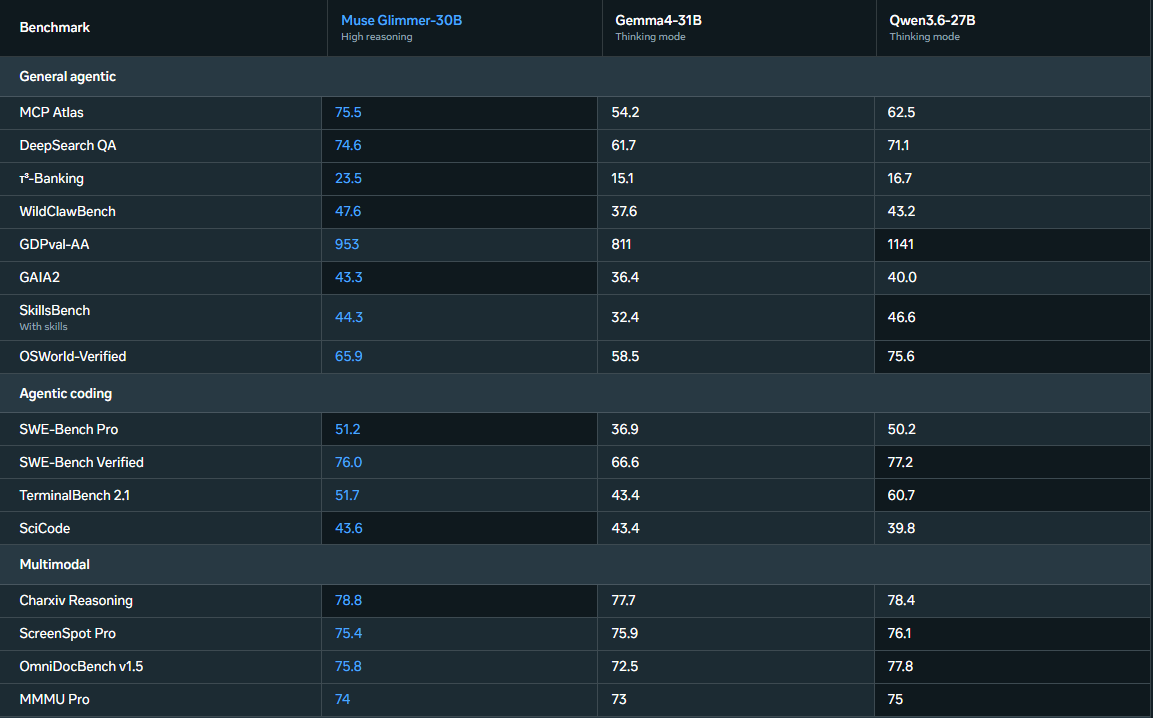
Image Credit - developer.meta.ai/models/muse-glimmer
It also supports over 100 languages, which typically gets mentioned last but matters if your codebase has multilingual comments, your team is distributed, or you're building something international-facing.
How to Install Muse Glimmer Open Weight
The weights are available now on Hugging Face. You can pull them in with Transformers in a few lines:
from transformers import AutoProcessor, AutoModelForMultimodalLM

processor = AutoProcessor.from_pretrained("meta-models/Muse-Glimmer-30B")
model = AutoModelForMultimodalLM.from_pretrained("meta-models/Muse-Glimmer-30B", device_map="auto")
Or via Docker:
docker model run hf.co/meta-models/Muse-Glimmer-30B
For serving at scale, vLLM and SGLang both work. For local desktop use, Ollama and LM Studio support are coming in the next few days. If you want the cloud-hosted option while the local setup matures, Together AI, Fireworks AI, and OpenRouter all have it available.
The recommended sampling setup is temperature 1.0, top_p 0.95, top_k 64. For anything involving complex code or multi-step agent tasks, set reasoning strength to high or xhigh in your system prompt.
Full developer docs live at Meta's AI Developer Centre.
Where This Actually Fits
Running an agent locally isn't right for every situation. If you're doing a quick task and your internet is working, a cloud API is still faster to get started with. But there's a whole category of work where local makes sense: anything touching private code you don't want leaving your machine, offline workflows, experiments where you want to run hundreds of iterations without paying per token, or just the cases where cloud latency adds up.
Muse Glimmer is the first local model where the agent loop actually feels like it's working with me rather than constantly making me wait to see if it handled the task. The speed matters. The failure recovery matters. The 131K context window matters for anything beyond trivial tasks.
For vibe coding specifically, where the whole idea is staying in creative flow while the AI handles implementation detail — a model that generates at 37+ tok/s, recovers from errors without intervention, and can read your screenshots is a genuinely different tool than what's been available locally before. The Hugging Face collection has all the variants including the GGUF quantizations, ExecuTorch builds, and the DFlash drafter weights — worth bookmarking if you want to experiment with different hardware targets.
Share this publication
Related Publications

Muse Spark 1.2 Review: Meta's Terminal Coding Agent Is Finally Here
Hands-on review of Meta's Muse Code terminal agent and Muse Spark 1.2. Testing persistent subagents, local event logs, /grill slash commands, and pricing.

Bring Antigravity Multi-Agent AI into Your IDE - Official Extensions Now Available
Google released official Antigravity extensions for VS Code, Visual Studio, JetBrains, and Zed — bringing multi-agent AI orchestration and shared project context directly to your editor.